For solar, battery and EV charger installers
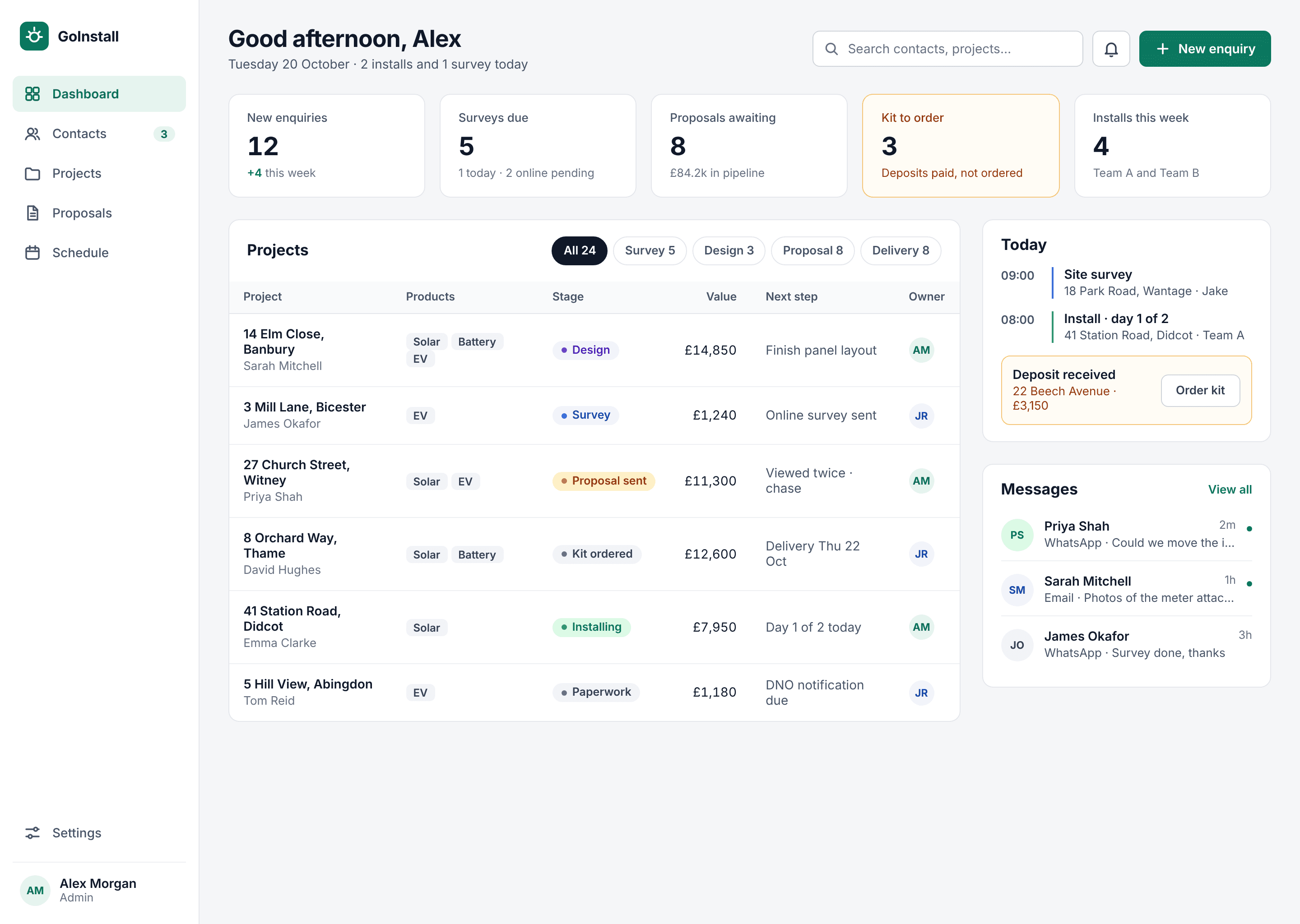
Run every install, from enquiry to handover, in one place
GoInstall brings your CRM, solar and EV design, proposals, supplier orders, installer app and DNO paperwork together. Enter a job once and it carries through to handover.
14-day free trial · no credit card · cancel any time
Works with the tools your team already uses
- Xero
- Stripe
- Google Calendar
- Outlook
- Gmail
- Your suppliers
The problem
Stop typing the same job in five different places
A typical install is spread across a CRM, a design tool, spreadsheets, supplier portals, WhatsApp and paper forms. Every hand-over is a chance to retype something, miss a deposit or lose the photo you needed.
Survey notes in one app, the design in another, the quote rebuilt in a spreadsheet.
Survey feeds the design, the design builds the proposal.
Chasing deposits, then copying the kit list into every supplier's portal.
The deposit lands and purchase orders draft themselves from the proposal.
Features
Everything an installer needs, built around the job
Each project moves from enquiry to survey, design, proposal, kit, install and paperwork, and nothing is entered twice.
CRM and messaging
A Kanban pipeline from enquiry to won. Email customers from the contact page and keep every message, note and update in one thread.
Solar design
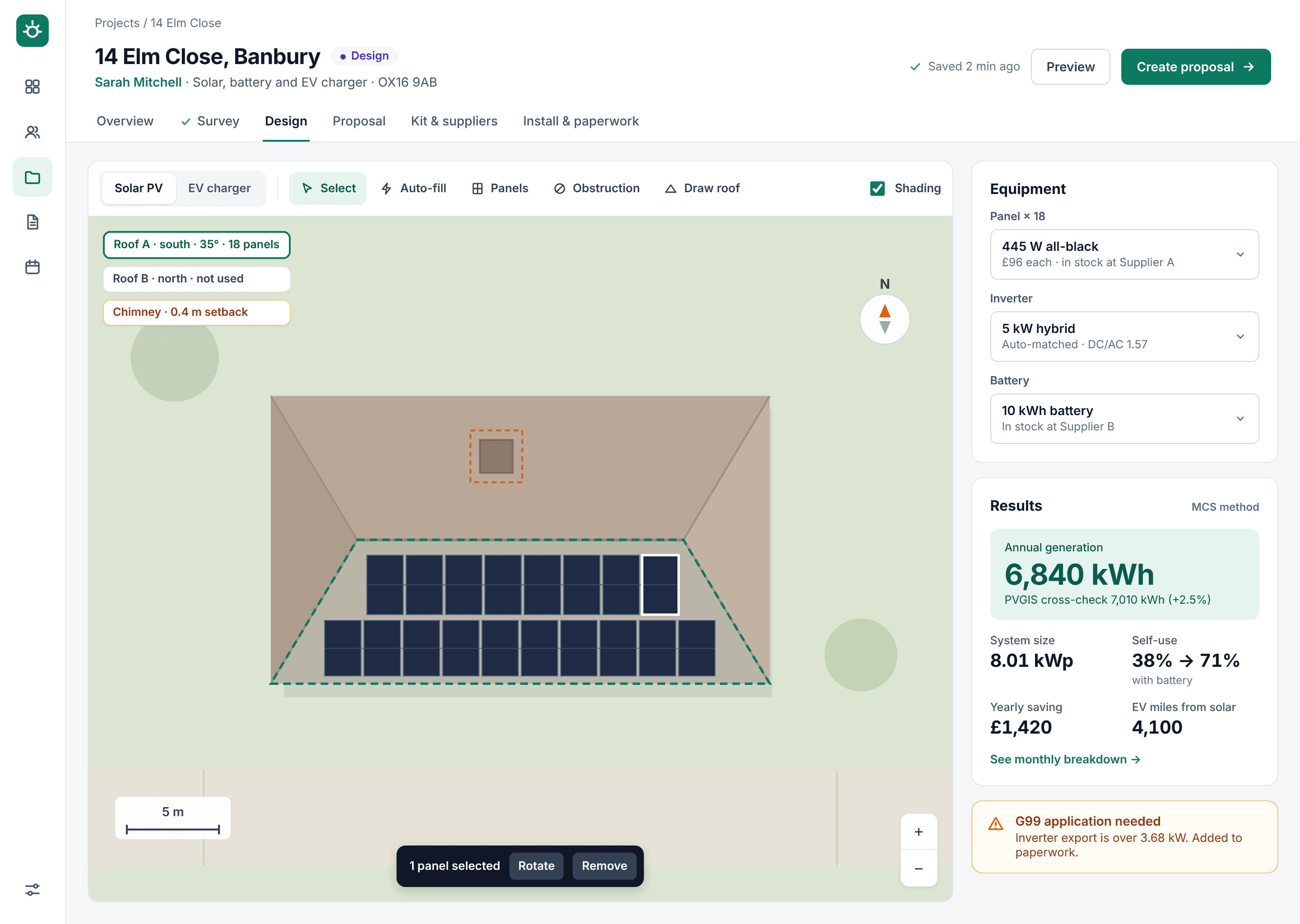
The roof loads from the address. Place panels, pick kit from your catalogue and get the MCS figure with a PVGIS cross-check.
EV charger design
Place the charger and supply, draw the cable route and check cable size, volt drop and maximum demand against your rules.
Proposals and payments
Branded proposals built from the design. Customers accept and sign online and pay the deposit by card.
Supplier ordering
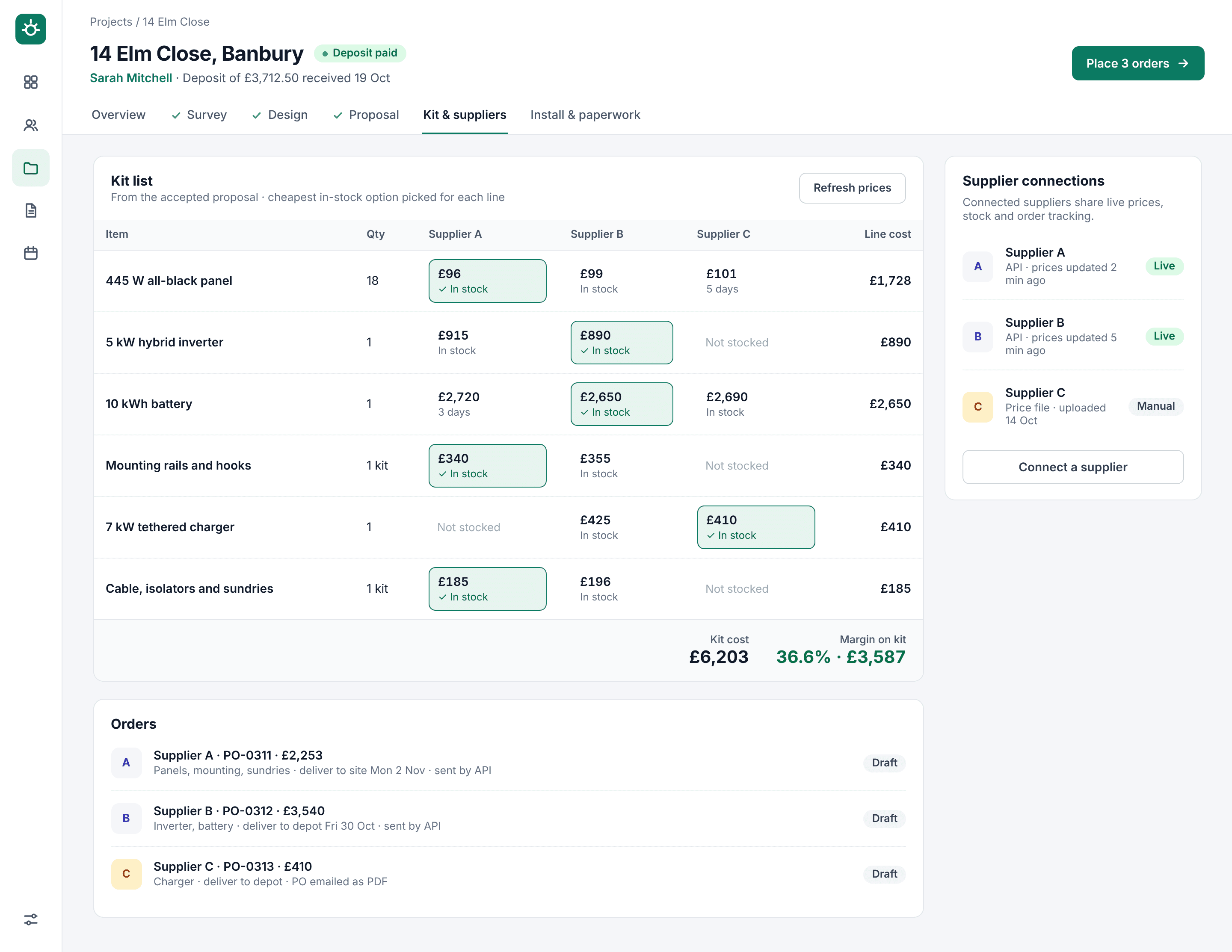
Compare prices and stock across suppliers, see your margin, and send one purchase order per supplier.
Installer app
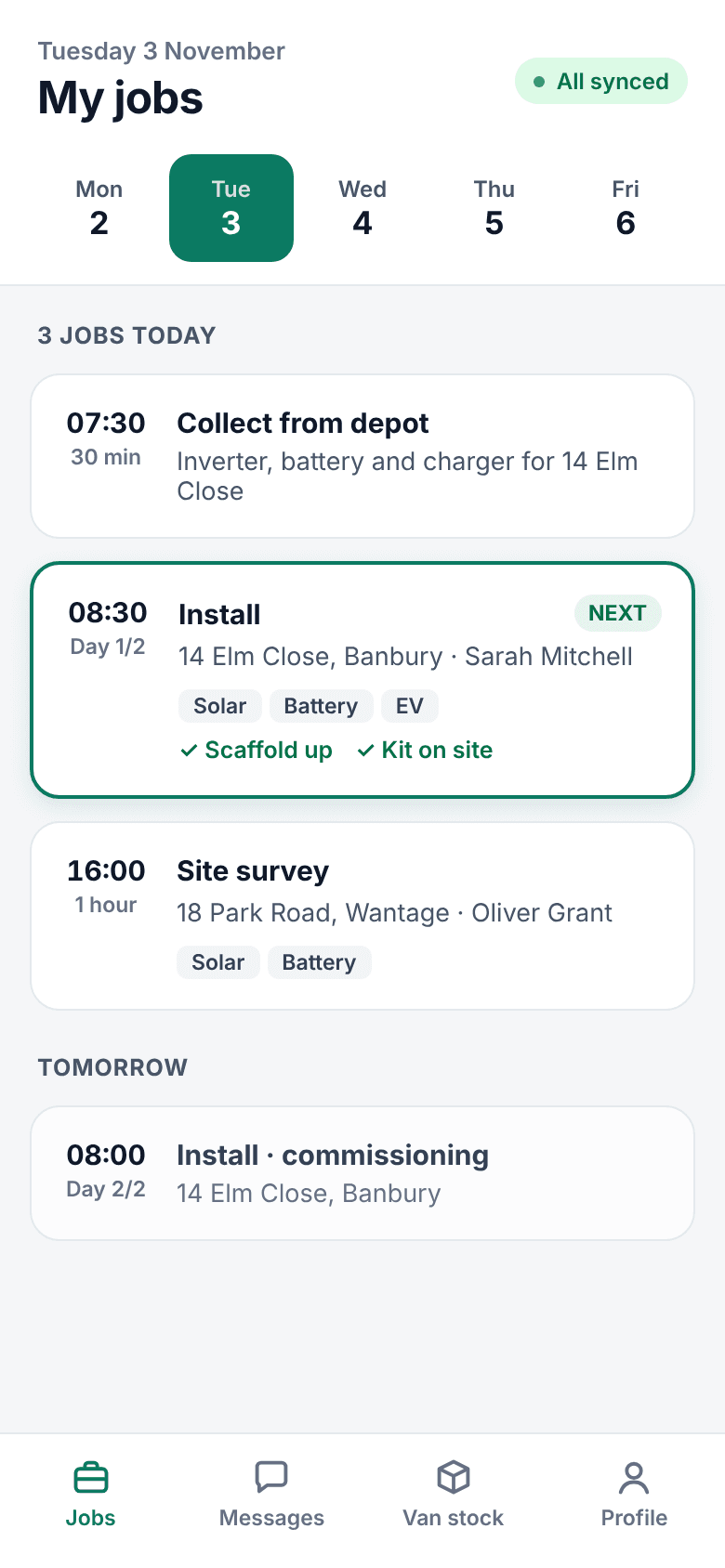
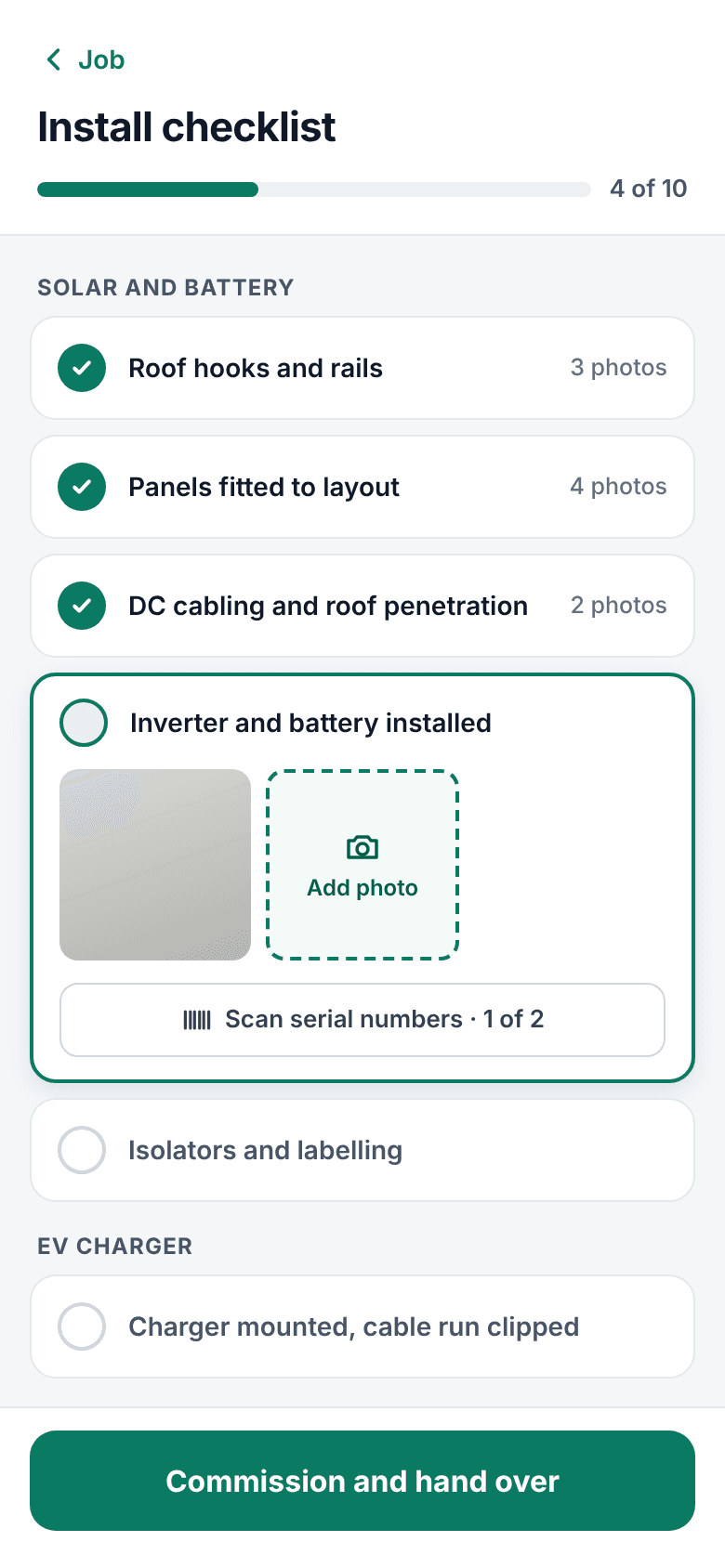
Jobs, site surveys, install checklists with photo evidence, test readings and customer sign-off, even offline.
Scheduling
Book installs, scaffold and electricians on a week calendar with clash warnings, synced to your team's calendars.
DNO and MCS paperwork
G98, G99, EV notifications, MCS certificates and handover packs, pre-filled from the survey, design and install.
Your brand, your catalogue
Your logo, colours and T&Cs on every proposal. Your products and prices, from price files or supplier connections.
Solar and EV design
Design solar and the EV charger together
Roof data loads from the address. Lay out panels, pick kit from your catalogue and the results update as you go.
- MCS annual generation, self-consumption and PVGIS cross-check
- Flags G99 when export needs it and adds the paperwork
- Shows the customer EV miles from their own solar
- Every change saved as a version you can go back to
Ordering
Order the kit the moment the deposit lands
GoInstall builds the kit list from the accepted proposal, picks the cheapest in-stock option on each line and shows your margin before you order.
- Live prices from connected suppliers, or uploaded price files
- One purchase order per supplier, delivered to site or depot
- Delivery dates tracked on the job
Installer app
Everything your team needs on site, even with no signal
Installers see their jobs, the design and the kit list. They capture surveys and photos, scan serial numbers, record test results and get the customer's signature. Everything syncs back to the office when they're online.
- iPhone
- Android
- Works offline
How it works
One job, start to finish
Step 1: Enquiry
A web form, call or referral becomes a contact and a project in one step.
Step 2: Survey
Send the online survey link; answers and photos land on the job with their source.
Step 3: Design and propose
Design solar and EV on the same job, then send a branded proposal.
Step 4: Deposit and kit
The customer signs and pays; purchase orders draft themselves from the proposal.
Step 5: Install and hand over
The installer app guides the job; paperwork and the handover pack follow.
Pricing
Simple pricing per user
Every plan includes the installer app, unlimited projects and UK support. Prices exclude VAT.
Starter
For small teams getting organised
£49per user / month
Start free trial- CRM, pipeline and email
- Online survey with photos
- EV charger design
- Proposals, deposits and invoices
- Scheduling, installer app (iOS and Android)
- Most popular
Pro
For installers doing solar, battery and EV
£69per user / month
Start free trial- Everything in Starter, plus:
- Solar and battery design
- MCS and DNO paperwork packs
- Supplier price comparison
- Purchase orders by supplier
Business
For multi-team and regional installers
Custom
Talk to us- Everything in Pro, plus:
- Multiple teams and depots
- Supplier API connections
- Data import from your current system
- Priority support and onboarding
Installer app users are included for installers and subcontractors on any plan.
Questions installers ask
Can't find your answer? Get in touch.
Can I move my customers and jobs across from my current system?
Yes. We import contacts and jobs from your current CRM or spreadsheets as part of onboarding, so you start with your pipeline in place.
Do I have to use a particular wholesaler?
No. Add any supplier. Upload their price file, or enter prices by hand, and GoInstall compares them on every job.
Does the installer app work without signal?
Yes. Jobs download to the phone, and photos, readings and signatures save on the device and upload when it's back online.
Is the solar yield MCS compliant?
Yield is calculated with the MCS method from the tables you work to, with a PVGIS figure alongside as a cross-check. The MCS figure is the one quoted.
Where is my data stored?
In the UK and EU. Each company's data is kept separate and only your team can see it.
Spend less time on admin and more time installing
Try GoInstall free for 14 days. No card needed.